%20(6).webp)
Click here to view and download the electronic voting instructions.
MAKING AN ALTERNATE A DELEGATE
IMPORTANT: The ONLY way to change an Alternate to a Delegate is through the submission of a form officially requesting the change.
Click here to access the form to change an alternate to a delegate. If you need any help at any time, please email council@dwtx.org or call 210-818-0705.
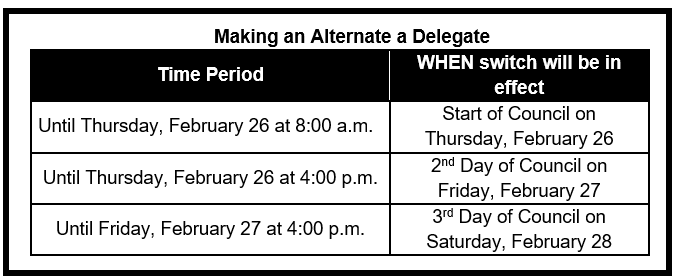
The times when an Alternate can become a Delegate are as follows:
1. An email address AND
2. A device (Ipad,Smartphone, laptop) you can bring to Council, which can connect to the Internet AND can access your email on it.
The email will appear as coming from The Episcopal Diocese of West Texas with subject “2026 Council Voting Link”. If you don’t see the email, you can also search from vote@simplyvoting.com.
1. Locate and open the Voting Email from Thursday, February 26 at 9:00 a.m.
2. Click on the voting link.
3. Complete the ballot
All ballots during Council will be announced by Bishop Read. When Bishop announces a ballot, you will go to the email “2026 Council Voting Link”.
OR, if your browser is still open to the Voting application, simply click on “Dashboard” at the top of the page. Remember: If the voting application “times out”, just go to the email and click on the link again.
If the application doesn’t take you right into the ballot, click on “Dashboard” and look under the Current ballots section.
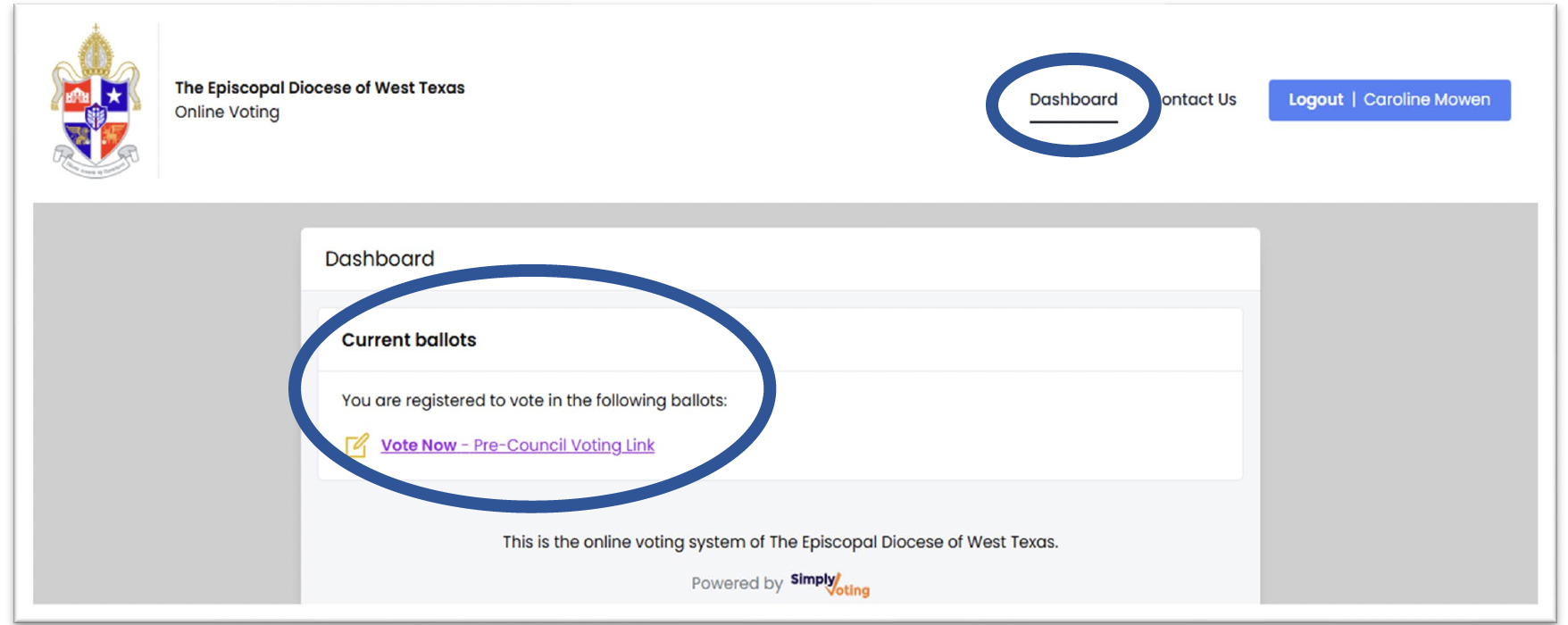
1. Click on the “Vote Now…” link. Bishop will tell you the ballot and how many selections you will be making and the ballot will have the “up to” number at the top.
2. Make your selection by clicking on the box next to the name. A checkmark will appear. Note: If you attempt to select more than allowed, you will get an error message.
3. Once you are satisfied with your selection(s), click on “Continue” at the bottom of the ballot. You will see your ballot to review.
4. To submit your ballot, you must “Confirm” your ballot. You can adjust your ballot as you want until you “Confirm” your ballot or until Bishop closes the ballot. To make a change select “Change”.
5. After you ‘Confirm” your ballot, you will get a green Success page for the ballot.
AND… IF your Delegate cannot be present, we will have the following times to replace a Delegate with an Alternate, making the Alternate the Delegate
TIME PERIOD WHEN THE CHANGE WILL BE IN EFFECT
Until Thursday, February 26 at 8:00 a.m. Start of Council on February 26
Until Thursday, February 26 at 4:00 p.m. 2nd Day of Council on February 27
Until Friday, February 27 at 4:00 p.m. 3rd Day of Council on February 28


Oops! Your browser must be updated in order to fully access dwtx.org. Select an icon below and open or download one of the following browsers to continue viewing dwtx.org. The website may feel broken by continuing to use this browser.


